Every group at its own time, with its own capacity.
Split your event into time slots, each with its own entry time and places: a guided tour every 15 minutes, three workshop sessions or several performances on the same day. Tell the generator "10:00 to 13:00, every 15 minutes, 20 places" and it builds the whole day in one go; buyers choose their time, full slots are marked automatically and at the door you know which group is coming in.
Splitting capacity into hourly slots by hand doesn't scale.
If your visitors go in by group, this will sound familiar:
The places in each slot are written down in a notebook or in Excel, and someone has to check every time the phone rings.
A slot ends up with more people than it can take and the guide finds twice the group they expected.
Setting up the slots for the whole season means creating dozens of identical timetables by hand.
At the door nobody knows which group is going in: the 12 o'clock group mixes with the 11 o'clock one and a bottleneck forms.
With this module the time slots generate themselves, each one's capacity is controlled as you sell, and the door knows whose turn it is to go in.
Everything you can do
Time slot generator
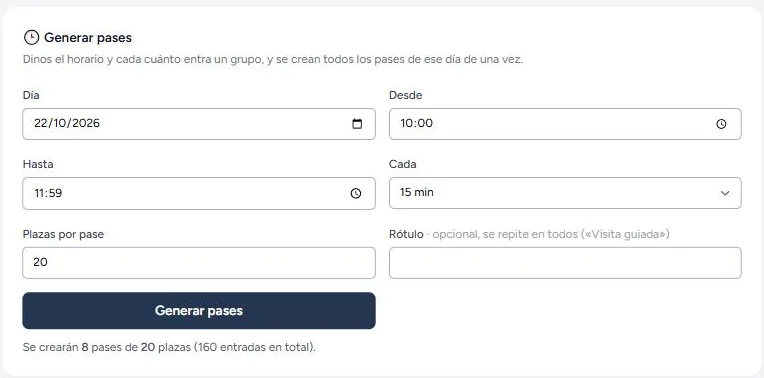
Time range, interval and places: "10:00 to 13:00, every 15 minutes, 20 places" and out come the 13 slots, each with its capacity. Before you click, you can see how many will be created.
Copy the whole day
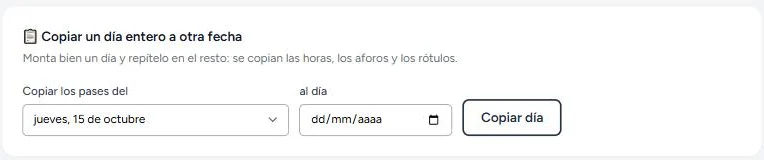
Set up one day properly and repeat it across your other dates with one click: times, capacities and labels are all copied. A whole season in two minutes.
Capacity for each slot
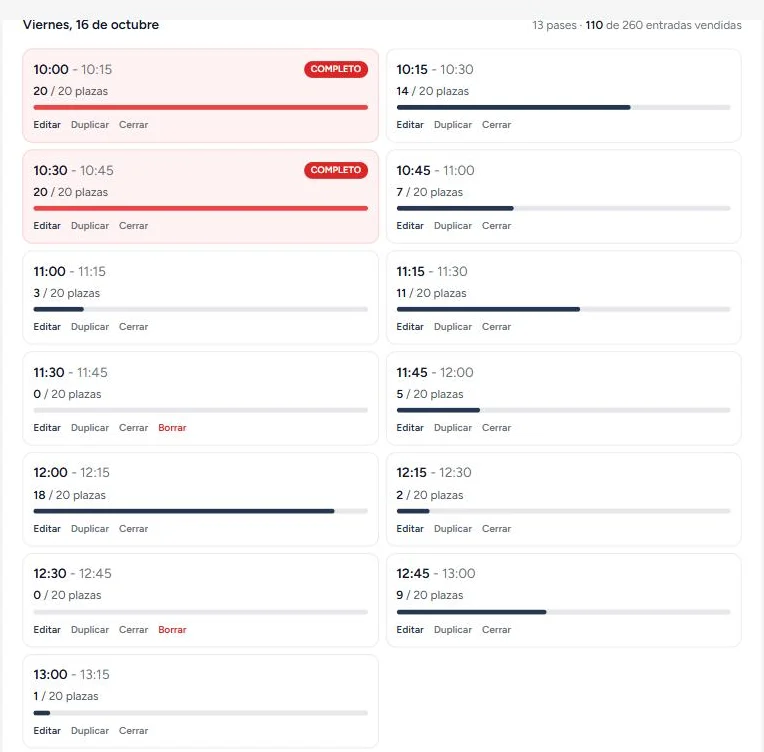
Each slot has its own places: if the guide takes 20 people, that's 20. Once it fills up, it's marked as full automatically and people choose another time.
Buyers choose their time
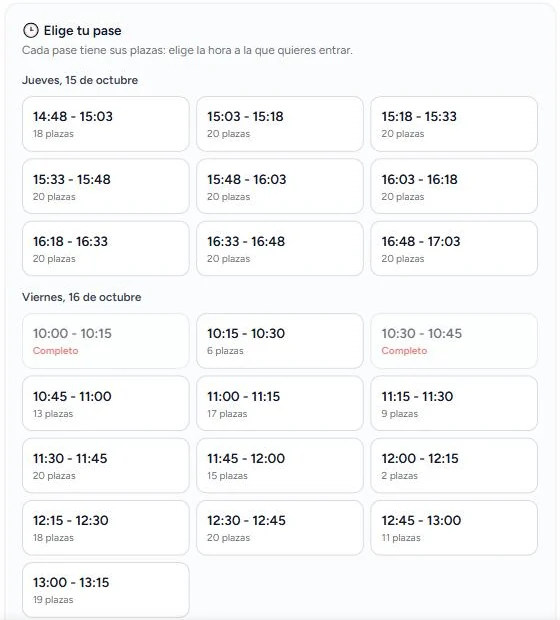
On the event page they see the slots for each day, with the places left in each one. Full ones are shown but can't be selected.
The door knows which group is going in
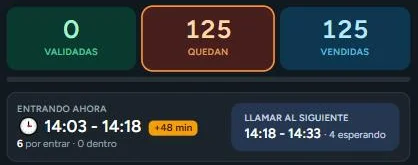
Your door staff call the slot they're letting in and the screen flags anyone who is early or lagging behind. They can always let someone through anyway: it's their call.
Copes with delays
If a tour sets off late, the door follows the actual group, not the clock: it shows how many minutes late you are and how many people from that slot are still to go in.
See it in action
And at the door, on the day

For anyone who splits their capacity by the hour
🏛️ Museums and visitor centres
Guided tours every 15 or 30 minutes with as many people as each guide can take, and no overcrowding in the galleries.
🏰 Castles, caves and archaeological sites
Spaces with capacity limited for safety reasons: each slot goes in with its exact number of visitors.
🍇 Wineries, olive mills and cheesemakers
A tour plus a tasting with a set number of places: sell tickets by time slot and every group arrives at the right time.
🎄 Seasonal municipal events
Living nativity scenes, haunted houses, visits to Father Christmas or the Three Kings: queues spread out by the hour instead of a two-hour wait.
👩🍳 Workshops, tastings and cookery demos
Three morning sessions and two in the afternoon, each with as many places as fit around the table.
🎭 Several performances on the same day
The 18:00 and 21:00 shows on a single page, each with its own capacity and tickets.
Built for how the day really goes, not how it looks on paper
- ✓ Generating again over an existing timetable doesn't duplicate slots: it only adds the new times.
- ✓ A slot with tickets sold can't be deleted; you close it instead, and anyone who has already bought keeps their time.
- ✓ A slot's capacity can't drop below what's already been sold: nobody loses their place because of a typo.
- ✓ If someone cancels or their ticket is refunded, their place goes back to the slot automatically.
- ✓ The time appears in the email, on the PDF ticket and on the door screen.
- ✓ With no slots created, your event sells exactly as it did before: the module stays out of the way.
It's that easy
Give the generator the time range, the interval and the places for each slot.
Copy the day to all the other dates you open to the public.
The buyer chooses their time from those still available.
At the door, you call each group and the screen flags anyone who isn't in that slot.
Frequently asked questions
Can I create time slots for several days at once?
The generator sets up a full day in one go (for example, 10:00 to 13:00 every 15 minutes). For your other dates there's the copy button: choose the day you've already set up and the new date, and all the times are repeated with their capacities and labels.
Can each time slot have a different price?
Not for now: the price is set by the event and is the same for every slot; the slots determine the time and the capacity. The price can, however, vary by purchase date using the event's price tiers (early bird and on the door).
What happens if a tour is delayed?
The door doesn't go by the clock, it goes by the group you're letting in: you tap "call the 10:30 slot" and from then on the screen checks against that slot, showing how many minutes late you are and how many people from that slot are still to go in. That way the alerts stay useful even if the day gets out of step.
If someone turns up outside their time slot, do they get in?
The screen flags it in amber — "not their turn yet" or "their slot has already gone in" — but it doesn't block anything: your team decides. At the door, people are in charge, not software.
Can I close a time slot without deleting it?
Yes, and that's what we recommend once you've sold tickets for that slot: once it's closed, it's no longer offered to the public and anyone who bought keeps their time. Deleting is only allowed for slots with no sales.
Does it work alongside numbered seating?
Not yet: an event is sold either by time slot or with numbered seating, not both at once (the same seat would have to be sold once for every slot). If yours is a theatre with two performances and allocated seats, let us know and we'll bear it in mind.
What if I want an overall capacity, with no limit per slot?
Leave the places per slot blank: the slot will just set the entry time, and the event's capacity controls the total.
Your day split into time slots, set up in two minutes.
Generate the whole day's time slots, copy the day to your other dates and let each visitor choose their time. All you have to do is open the door.
Time slot generator · Capacity per slot · Built for the door